What happened
The updated Gemini Flash page lists Gemini 3.8 Flash as generally available across the Gemini app, Gemini Enterprise Agent Platform, Google AI Studio, the Gemini API, AI Mode, and Google Antigravity. Google calls it its most intelligent workhorse model yet for coding and agents, with explicit emphasis on software engineering, long-horizon work, and document-heavy tasks.
The specifications make that direction concrete. Inputs can include text, images, video, audio, PDFs, and code within a one-million-token window. Output is text, with a 64,000-token limit. Tool support includes function calling, search, and computer use. Those are the ingredients for workflows that read a large workspace, decide what to do, act through tools, and keep enough context to recover when an intermediate step fails.
Google highlights several demonstrations: a playable 3D game produced through a looping instruction, a DOS-style Google Maps interface created in one prompt, an interactive topographic map using public datasets, and a Three.js hardware visualizer. Demonstrations are selected examples, not reliability tests, but they show the product category Google wants developers to imagine: an agent that combines code generation, visual reasoning, retrieval, and iterative execution.
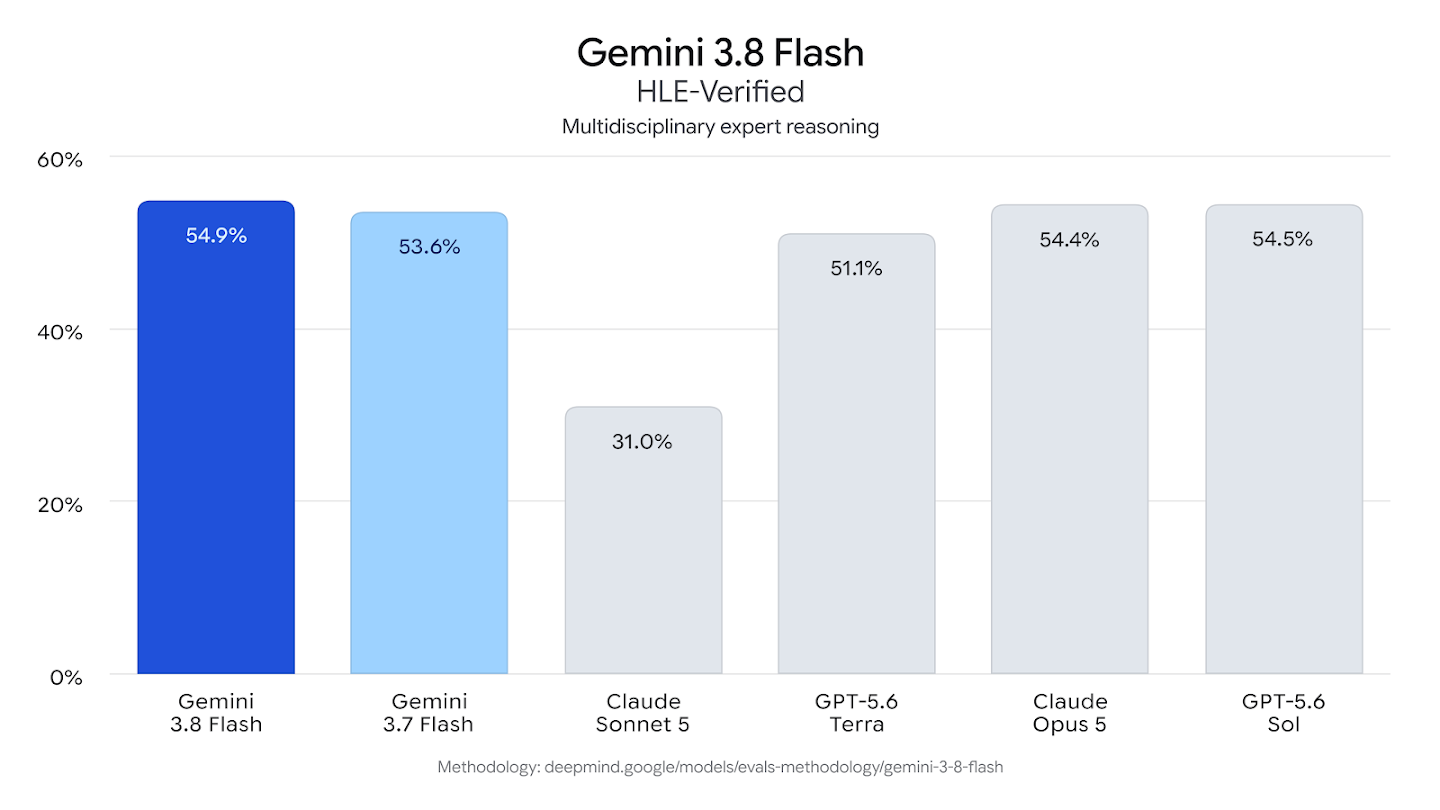
On evaluation, Google reports a 54.9% result on HLE-Verified and says 3.8 Flash outperforms 3.7 Flash on finance, legal-agent, and long-horizon software tasks. It also quotes Glean as completing more than three times as many tasks as 3.7 Flash in that company's evaluations. The associated model card is the more durable record for intended use and limitations.
The word "Flash" still signals latency and cost discipline, but the product definition is widening. Earlier small and fast models were often used for classification, extraction, or lightweight chat. Google is now positioning a Flash-tier model as the engine for long-running work that once would have been reserved for a larger, slower model.
Why it matters
Agent economics multiply small per-step differences. A workflow may call a model dozens or hundreds of times, reread a large context, and invoke external tools. A model that is slightly less expensive or faster at each step can make an otherwise impractical process viable — provided it remains reliable enough that retries do not erase the savings.
The million-token input window is useful, but it is not a strategy by itself. Teams still need to select evidence, manage state, and decide what should be reloaded at each step. Sending an entire workspace on every turn can increase cost and make relevant details harder to find. The stronger design is often a large available window paired with a disciplined context manager.
Computer use also moves the trust boundary. Once a model can manipulate an interface, application teams need permissions, previews, confirmations, and logs that match the consequence of each action. The model's capability page describes what it can do; the application's control system determines what it is allowed to do.
The fine print
The performance figures and demonstrations come from Google and selected partners. Results will depend on prompts, scaffolding, tool quality, and the definition of task completion. General availability does not mean every surface has identical quotas, pricing, or feature support, so developers should check the documentation for their chosen endpoint.
The fast model is learning to stay late at the office. Someone should still check its tool permissions before leaving it the keys.